
Let’s face it – navigating the world of mortgages can be as complicated as assembling IKEA furniture without the instructions. But here’s the thing: I’ve got a secret weapon (or rather, a whole arsenal of them) to make the process smooth, efficient, and stress-free for my clients. Whilst all these tools add up in cost, I want to ensure my clients have a streamlined, efficient and easy process as much as possible in the environment we are in of high regulation and where Banks are forced to deep dive in every little aspect of someone’s business.

From organising my day to keeping track of endless details, these tools are the unsung heroes of my business. Let me take you behind the scenes and show you the systems that make my life – and yours – a whole lot easier.
1. Mercury Nexus
Mercury Nexus is the bread and butter of my day-to-day operations. It’s the CRM system provided by my aggregator, and honestly, it’s 85% amazing. The best part? They’re constantly improving it, so the future looks bright.
From managing client information to tracking applications, Mercury Nexus is the beating heart of everything I do. It’s not perfect (yet), but it’s indispensable. Think of it as the Swiss Army knife of mortgage brokering – it does a bit of everything. This system will create my client portal for me that they can log into so they may add information, answer key questions and especially the ability to upload sensitive documents and information in an encrypted and safe environment.
The other area it plugs into is “Open banking” and “Cash Deck” – Both systems do the same thing here, in short they will capture the clients expenses and bank statements as well as any existing loan statements automatically, saving them time and effort in collating it all.
2. Motion.ai
This one’s a lifesaver – or should I say “time-saver”? Motion.ai is like a personal assistant that’s always on your case (in a good way). It’s a to-do list on steroids: you input your tasks, and it blocks out time in your calendar based on how long each one will take.
It’s perfect for keeping me on track and making sure nothing slips through the cracks. While I don’t use its booking link feature (more on that later), it’s still an absolute gem. If you’re a student, you can even snag a discount.
[Check it out here.]
3. Canva
Canva is my creative playground. Whether I’m whipping up social media posts, designing client materials, or just playing around with ideas, Canva makes it ridiculously easy.
It’s user-friendly, versatile, and perfect for anyone who’s not a professional designer but still wants to create professional-looking content. If you’ve ever seen a snazzy post on my socials, there’s a good chance Canva had something to do with it.
[Explore Canva here.] (https://www.canva.com/)
4. Evernote
Evernote is where I stash the mountain of information that comes with being a mortgage broker. From broker IDs to bank-specific details, it’s all neatly organised into notebooks.
For example, I’ve got a notebook for each bank, filled with everything I need to know about working with them. It’s like having a digital filing cabinet that’s always at your fingertips. Any updates come from the lenders, I can just email it into my evernote. (if there is any brokers reading this, they know how many emails and updates we get each day with over 50 lenders in the market we have access to)
[Learn more about Evernote here.] (https://evernote.com/)
5. Otter.ai
Otter.ai is next-level technology. It joins Zoom or Teams meetings automatically, takes detailed notes, and even summarises objectives, action points, and pain points.
It’s like having a personal scribe who never misses a thing. You can also use it in face-to-face meetings by running it on your phone. Honestly, I don’t know how I managed without it.
[Check out Otter.ai here.] (https://otter.ai/)
6. Sintra.ai
Sintra.ai is an AI powerhouse that can handle just about anything. Whether it’s automating tasks or building a knowledge base, this tool is packed with potential.
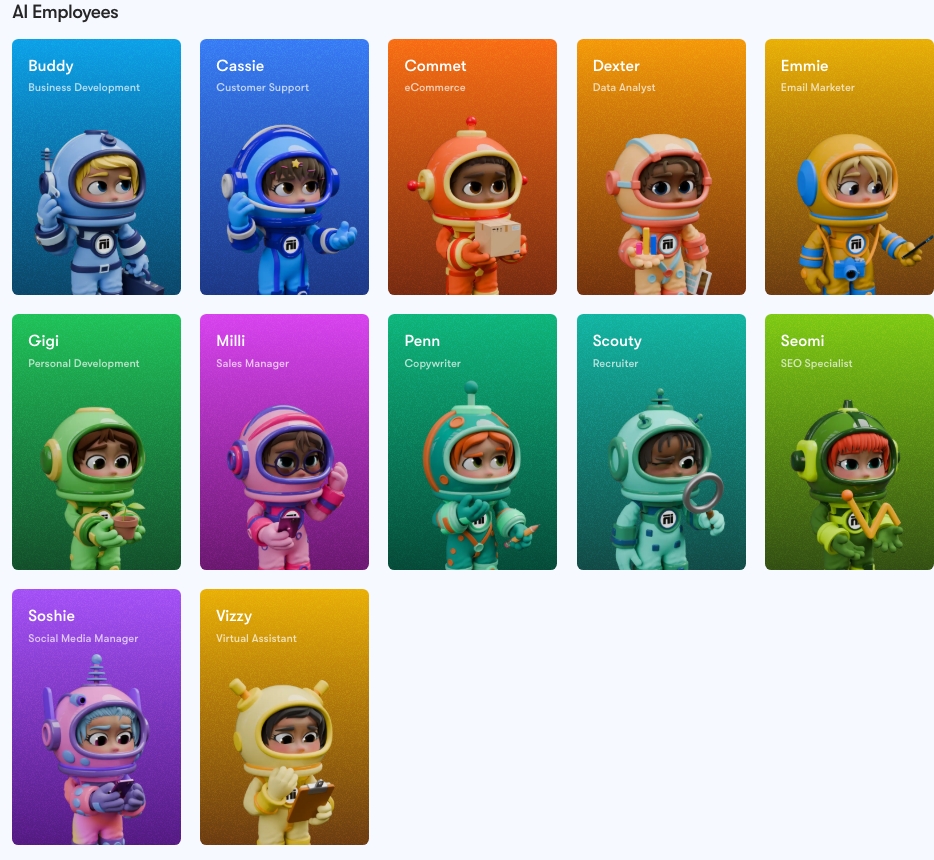
While I’m still exploring everything it can do, it’s clear that Sintra.ai is a game-changer. Think of it as you now have 12 new employees, each employee has a name and a role ranging from Business development, a data analyst, SEO specialist, personal development and a virtual assistant.
Bonus: they’re offering 60% off, plus an extra free month with my code (HGOI8).
[Explore Sintra.ai here.] (https://sintra.ai/)
7. Adobe Full Cloud Suite
For professional-grade design and document handling, Adobe is the gold standard. I use it for everything from social media graphics to email marketing designs. The most used in this would be Adobe acrobat, I use this to have most things digitally signed by clients, we do have DocuSign built into our CRM system however I find this a much better experience for my clients so happy to pay for it.
Pro tip: If you’re a student, you can get the full suite for $287 a year – a steal compared to the usual $1300
[Discover Adobe here.] (https://www.adobe.com/au/acrobat/pricing.html)
8. Calendly
Calendly is my go-to for scheduling appointments. While Motion.ai has a similar feature, I prefer Calendly for its sleek design and branding options. It makes booking time with me a breeze for clients. In saying this, I have now (as of this month) transitioned over to motion.ai – this driver was for simplicity and streamlining the servcies I use.
9. Xero
Xero makes managing business finances simple. It connects to my bank accounts, tracks expenses, and even lets my accountant lodge BAS directly.
At $40 a month, it’s a no-brainer for anyone running a business.
[Learn more about Xero here.] (https://xero.com/)
10. Quickli
Quickli is a must-have for brokers. It simplifies servicing calculations by letting you input data once and export it to any bank.
At $54 a month for the basic plan (or $102 if you want branding), it’s worth every cent.
Having the ability to input into the system and see live what Banks will approve a deal helps speed things up, when the client has selected the bank they wish to use the system will export that directly to the lenders servicing worksheet or system.
[Explore Quickli here.] (https://quickli.com.au/)
11. Marketing Hub
Provided by Connective, (also knnown as Active Campaign) Marketing Hub handles email campaigns, automation, and RBA updates. It’s a powerful tool for staying connected with clients and prospects.
12. Zoho Social
Zoho Social is my secret weapon for social media management. It lets me schedule posts across all my platforms – Instagram, TikTok, LinkedIn, Facebook, and more – in one go.
It’s a huge time-saver and keeps my content consistent. I spend 2 hours on a Sunday loading up my content and then it will post automatically at the times I have told it to.
[Check out Zoho Social here.](https://social.zoho.com.au/)
13. Broker Pages
For client reviews, I use Broker Pages. It’s a great way to showcase feedback and build trust with potential clients. Google reviews are another good option, but Broker Pages adds a professional touch.
https://brokerpages.com.au/mortgage-broker/josh-beniston/
Why These Tools Matter
Each of these tools plays a unique role in making my work as a mortgage broker more efficient and client friendly. They help me stay organised, save time, and deliver a better experience for my clients. Yes there is a large cost per year to have access to all of this but if it helps add a great client experience and more efficient service offering it makes sense.
By investing in the right systems, I can focus on what really matters: helping you achieve your property goals.
Final Thoughts
Technology is constantly evolving, and I’m committed to staying ahead of the curve. If you’re looking for a broker who combines expertise with the latest tools, let’s chat. Together, we’ll make your property journey as smooth as possible.
 The Property Finance Broker
Leave a comment